
Devlog – Day 17
Summary
Today’s work focused on bringing the experience to a more finalized, cohesive state across environment, atmosphere, UI flow, and last-minute fixes. The bulk of the day was spent polishing visual presentation, reinforcing the end-of-game sequence, and eliminating immersion-breaking issues such as debug output and unclear interaction prompts. Together, these changes significantly improve the game’s sense of completion, clarity, and overall production quality.

What I Worked on Today
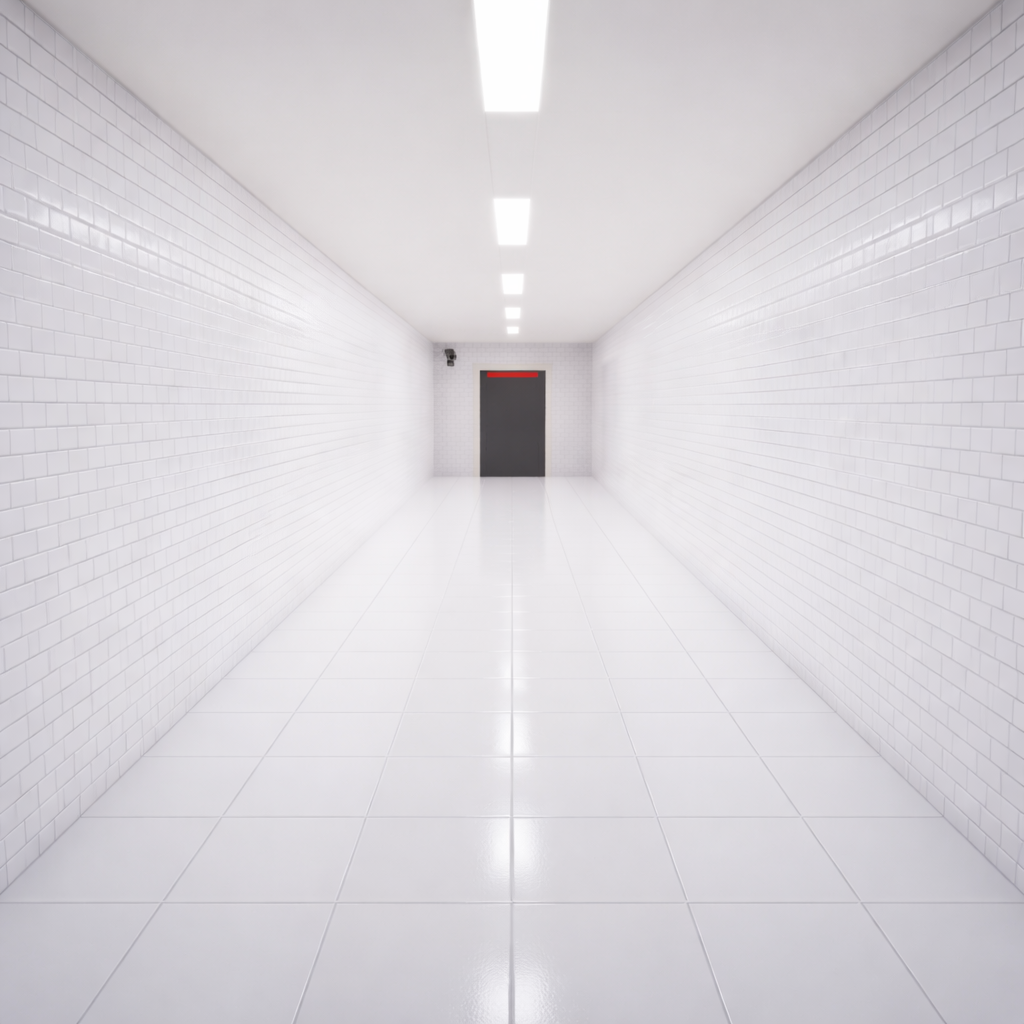
[Level 1 / Environment] – Exit Corridor Construction (Sterile White)
Intent
Build a long, narrow sterile white exit corridor inside the existing level to act as the final transition space after the last door opens. The corridor should use a white-on-white subway tile look and evenly lit clinical lighting.
What Actually Happened
A new exit corridor was blocked out using generic wall and floor Blueprint assets, then upgraded with custom white subway tile textures for walls and floor along with a ceiling paint texture. Lighting was constructed using emissive plane meshes and rectangular lights tuned to a maximum cold temperature to maintain a clinical feel. A door was placed and re-textured to match the corridor materials, a camera actor was added for framing, and linear ceiling details were aligned with the lighting. An AI voice line was added to play when the player enters the corridor to confirm test completion.

Accomplished
- [STEP] Constructed exit corridor using generic floor and wall Blueprint assets.
- [STEP] Created white subway wall and floor tile textures using ChatGPT and generated normal maps in GIMP.
- [STEP] Applied custom tile textures to corridor walls and floor and applied Fab paint texture to the ceiling.
- [STEP] Placed BP_Door at the end of the corridor and applied white texture variants to match corridor materials.
- [STEP] Built ceiling lighting using emissive plane meshes with high-glow white material and rectangular lights set to maximum cold temperature.
- [STEP] Added a camera actor at the end of the corridor for environmental framing.
- [POLISH] Added linear ceiling detail elements aligned with corridor lighting to increase visual depth and structure.
- [STEP] Added AI voice line confirming test completion that plays when the player enters the exit corridor.
Why This Matters
- Establishes a clear, controlled end-of-game space that visually contrasts earlier areas.
- Locks in a reusable workflow for sterile environments and clinical lighting.
- Provides an unambiguous completion signal tied directly to player movement.
[Level 1–2 / Environment] – Final Visual & Atmospheric Polish Pass
Intent
Add environmental detail, wear, lighting, and ambient audio to make the level feel lived-in and visually finalized without altering gameplay or puzzle logic.

What Actually Happened
A comprehensive set-dressing pass was completed across the level, focusing on believable human presence. Workbenches, desks, lockers, and server rooms were populated with appropriate props, while decals and lighting adjustments were used to add wear and depth. Ambient and incidental audio was layered in to reinforce atmosphere, and placeholder assets and repetitive elements were removed.
Accomplished
- [POLISH] Added tools, rags, and small maintenance props to workbenches with asymmetrical placement.
- [POLISH] Added keyboards, mugs, and light desk clutter to desks and control areas.
- [POLISH] Added interior locker clutter and personal items visible on inspection.
- [POLISH] Added server room maintenance carts, cable trays, and loose technical props.
- [POLISH] Added and adjusted spot lighting to highlight key areas while preserving depth.
- [POLISH] Added ambient and incidental sound effects without interfering with gameplay.
- [POLISH] Removed placeholder props and materials and eliminated obvious repetition.


Why This Matters
- Makes the facility feel believable and actively used.
- Brings visual presentation closer to final quality.
- Ensures screenshots and playtests reflect near-finished environments.
[Global / UI Flow] – Start Screen & End Sequence Implementation
Intent
Implement a minimal start screen and a controlled end-of-game sequence that bookend the experience and return the player to the start screen after completion.
What Actually Happened
A start screen widget with title, Start Game, and Quit Game options was created and set as the initial UI state with UI-only input and looping ambient audio. Starting the game cleanly restores gameplay input and stops the audio. For the end-of-game flow, a trigger in the exit corridor plays an AI voice line, fades to black, disables input, shows credits for a set duration, and then loads a dedicated menu level. A pause menu was also implemented and tested.

Accomplished
- [STEP] Created and displayed WBP_StartScreen on game launch with UI-only input.
- [STEP] Added Start Game and Quit Game buttons with bound click events.
- [STEP] Added looping ambient audio and background imagery to the start screen.
- [STEP] Restored gameplay input and stopped ambient audio when starting the game.
- [STEP] Added exit corridor trigger to play AI completion voice line.
- [STEP] Triggered fade-to-black and disabled player input at end-of-game.
- [STEP] Created and displayed credits widget, then removed it after a delay.
- [CHANGE] Added a dedicated Level_Menu and loaded it after credits.
- [STEP] Implemented pause menu with resume and quit functionality.
- [TEST] Verified full end-to-end flow from gameplay to credits and return to menu.
Why This Matters
- Creates a clean, repeatable game loop.
- Prevents input and audio conflicts across UI and gameplay states.
- Establishes a solid foundation for future UI and flow extensions.

[FIX] Final game fixes
Intent
Clean up last-minute presentation issues before final build.
What Actually Happened
A final polish sweep removed lingering debug output from the word console and clarified interaction prompts by explicitly telling the player which key to press.


Accomplished
- [REMOVE] Removed Print String debug message from BP_WordPanel.
- [POLISH] Added “Press E” wording to interactable LookAt prompts.
Why This Matters
- Removes immersion-breaking developer artifacts.
- Improves clarity and usability at interaction points.
Technical Notes
- Emissive planes combined with rectangular lights proved effective for evenly lit sterile environments.
- Separating menu flow into a dedicated level simplifies state management for UI and audio.
- Final polish passes benefit from explicitly checking for leftover debug nodes and placeholder assets.
Challenges & Lessons Learned
- Maintaining consistency across visual, audio, and UI systems requires frequent full playthrough testing.
- Small presentation issues (debug text, unclear prompts) have an outsized impact on perceived quality.
- Locking down workflows for lighting and set dressing early makes later polish faster and more consistent.
Next Steps
- Conduct a full regression playtest focusing on edge cases and transitions.
- Capture final screenshots and footage for documentation and store pages.
- Review remaining backlog items to confirm readiness for release.